
Invitation Maker: Cards & RSVP
Greetings IslandEvents
4.96.93K Reviews
- Version
- 3.13.0
- Installs
- 10.00M
- Age Rating
- Everyone
Screenshots


Our Review of Invitation Maker: Cards & RSVP
 Analysis by Appyee
When I’m choosing an invitation app, I care less about having endless design controls and more about getting a clear, attractive invite ready without turning event planning into another project. Invitation Maker: Cards & RSVP is aimed at that practical middle ground: it gives me a starting design, room to personalize it, and a way to share event details. Greetings Island makes this free Events app for Android and iOS, and its broad appeal is reflected in a 4.8 average from around 181,000 ratings, with over 10 million installs.
What I would decide before opening it
The first question is whether I need a designed invitation or a complete event-management system. This app is best approached as a creative tool for making an invite, not as the place to plan every part of a gathering. If the main task is making a card that feels more personal than a plain message, its templates and editing options make sense. If I need detailed guest tracking, scheduling, or a whole event workflow, I would first decide whether a separate planning tool is more important than the invitation itself.
I’d also think about how guests will receive the invitation. A digital design is convenient when the people I’m inviting are easy to reach by email or social media; a printable version may suit a family gathering where some guests prefer paper. The app is described for everyone, and it’s free to install, though in-app purchases range from $0.99 to $23.49 per item. That makes it sensible to explore the available choices before building a design around anything that might require a purchase.
Getting Started with Ease
The first thing I noticed about Invitation Maker: Cards & RSVP is its user-friendly interface. Seriously, even if you’re not tech-savvy, you’ll find it incredibly easy to navigate. Once you download the app, you’re greeted with a clean layout that invites you (pun intended) to start creating right away. No confusing menus or overwhelming options — just straightforward, intuitive design.
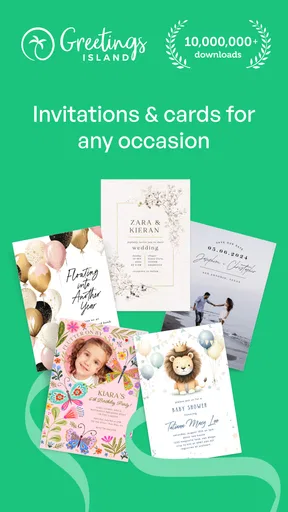
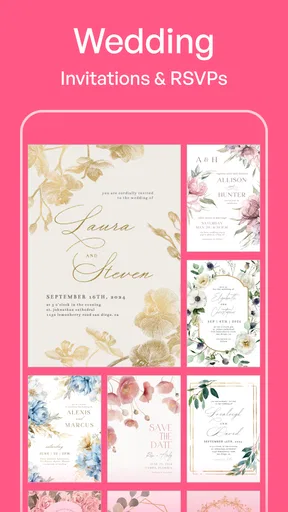
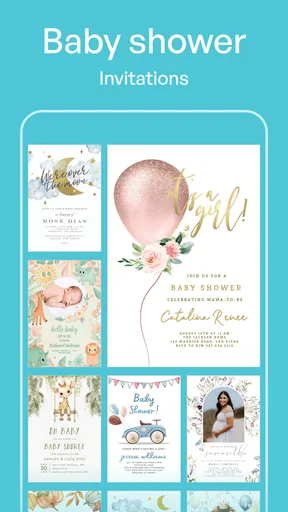
You start by selecting the type of event you’re hosting. Whether it’s a birthday bash, wedding, or a corporate event, there are templates galore. I found the selection quite impressive, with each template being fully customizable. The app even offers a nifty tutorial for first-timers, which is a lifesaver if you’re feeling a bit lost.
Customization Galore
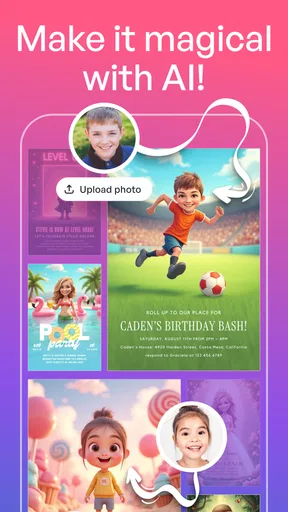
Customization is where the app really shines. You can tweak every element of your invitation. Want to change the color scheme to match your party’s theme? No problem. Need to add a photo of the birthday boy or girl? Easy peasy. The app offers a plethora of fonts and colors, so you can make your invitation as unique as you are.
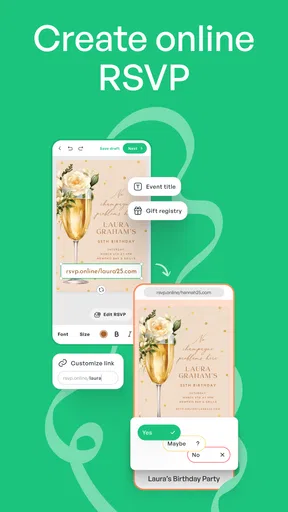
What I particularly loved is how the app allows you to experiment without any pressure. You can try different styles and save multiple drafts until you find the perfect look. There’s even a feature to add RSVP details, which is super handy for keeping track of who’s coming to your event.
Making a design work in real life
For a useful test, I’d treat the invitation like a guest will: read it at phone size before sharing or printing. A layout that looks balanced while editing can become harder to scan when it’s reduced, especially if I’ve added a long venue address or several lines of practical information. I’d keep the event name and key details easy to spot, then use decorative fonts for a short heading rather than every line. This small check can prevent a pretty card from becoming a confusing one.
A second helpful habit is to settle the wording before spending time on colors and decoration. For a birthday, I’d confirm the date, start time, location, and RSVP instructions first, then make the design fit those details. If plans change, editing a saved draft is more straightforward than rebuilding the invitation from scratch. Keeping a version with the essential information also gives me a safer fallback if I later decide a more elaborate design is too busy.
The ability to save multiple drafts is especially useful when another person is helping choose the look. I can prepare a restrained option and a more playful one, then compare them side by side rather than repeatedly changing a single design and trying to remember what it looked like. That’s a practical way to make a decision for a shared event without letting visual tweaks swallow the time needed for the rest of the planning.
Features You Can’t Miss
Beyond the basics, Invitation Maker is packed with features that elevate your invitation-making game. Here are a few highlights:
- High-Quality Exports: Once you’ve crafted your masterpiece, you can export it in high-resolution formats suitable for printing or sharing digitally.
- Social Media Integration: The app makes it a breeze to send out invitations via email or share them on social media platforms like Facebook and Instagram.
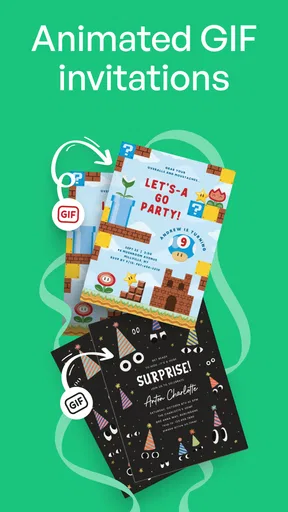
- Variety of Templates: From minimalist to extravagant, there’s a template for every style. And if you’re feeling particularly creative, you can start from scratch!
The app also regularly updates its template library, so you’ll always have fresh options for your next event. This is a huge plus for someone like me who loves hosting themed parties throughout the year.
Where this app has an edge
The strongest reason I’d pick this app over a blank document or a basic text message is the combination of a ready-made visual starting point and enough room to make it feel specific to the occasion. A plain message is faster, but it won’t give a gathering the same sense of occasion. A general-purpose design editor may offer a broader creative canvas, yet starting with an event-oriented template can spare me from building the whole layout myself. For a casual celebration, that balance is more valuable than having every possible design control.
It also suits the moment when I know what I want the invitation to say but don’t know how to arrange it attractively. I can choose a style, add details, and see whether a photo helps or distracts. For example, if I’m organizing a small birthday dinner after work, I can prepare the date and address during a short break, try a couple of looks, and send the invite digitally once I’m happy. That is a more realistic use than expecting the app to organize the dinner or manage every reply for me.
RSVP wording deserves a little care. Including a request to respond is useful, but I would not assume that the invitation design alone replaces a dedicated guest list. I’d make the response instruction explicit—such as whom to contact and by when—and keep track of replies in the channel I’m already using. That simple division of labor lets the app handle presentation while avoiding confusion about where guests should answer.
When a different option may be better
If I’m creating a highly bespoke design, a general graphic-design app may be a better fit because the work can begin with a blank canvas and follow a more exact visual plan. That flexibility comes with more decisions, though: I may need to build the layout, hierarchy, and spacing myself. Invitation Maker is the easier choice when a template is close enough and I want to spend my effort on the event rather than on constructing a design system.
For a gathering where attendance changes frequently or guest coordination is the central problem, I’d use a dedicated event-planning service or a group conversation alongside the invite. A card is good at presenting the occasion; it is not automatically a substitute for ongoing coordination. Likewise, someone who sends only a few informal invitations may find a quick message more efficient. The app’s value rises when I want the invitation itself to feel considered, not simply when I need to tell people where to meet.
There is also a trade-off between choice and speed. Having templates, fonts, colors, and photo options makes it possible to personalize the result, but it can tempt me to keep adjusting details that most guests will barely notice. I’d set a simple limit: choose a template, make the essential edits, compare one alternative, and stop when the information is readable and the tone feels right. That keeps customization enjoyable instead of turning it into a design rabbit hole.
Sharing, printing, and the small checks that matter
Before sending a digital invitation, I’d check that the final image or design is legible on a small screen and that the method of sharing suits the guest list. Social sharing can be convenient for people who already use the same platform, while email may be more suitable for a mixed group. For printing, I’d review the exported result and make sure the text and image placement still look balanced on the page. A quick preview is worth the minute it takes, particularly when the invite includes a photo or detailed directions.
One limitation of a template-led approach is that not every design will match every event or personal taste. A template can save time, but if I have a precise brand style, unusual wording, or a very specific layout in mind, I may have to compromise or move to a more flexible editor. Similarly, decorative choices can compete with event details if I add too many. I’d prioritize contrast and clear wording over extra flourishes, especially for invitations that older relatives or guests reading on small screens need to understand quickly.
For someone wondering whether they can begin without paying, the app is free to download, while optional in-app purchases are available. I’d browse before committing to a particular design direction and avoid assuming every visual option is included at no cost. It runs on Android devices with version 6.0 or later, and the current version is 3.6.2. Those details make it easier to check basic compatibility before investing time in a draft.
Cost of switching and choosing a workflow
Trying the app does not require replacing every tool I already use. I can create an invitation here and continue coordinating in my usual messages or calendar. That low-commitment approach is a good fit for a one-off birthday or dinner: I get a more polished card without having to move the whole guest list into a new system. If I later find that design is the only part I want help with, I can keep using it for that focused job.
The harder switch is not technical; it is deciding where the final source of truth lives. If I change the date after sharing an invite, guests may still have the first version saved. I’d update the people directly through the same channel used to invite them, rather than relying on a revised design alone to reach everyone. For events with many changes, a shared event page or group thread may be more reliable than sending successive versions of a card.
Greetings Island’s app belongs to the Events category, and its popularity suggests it has found an audience among people who want invitations to look more polished without beginning from a blank page. I’d read the 4.8 average and roughly 6,900 written reviews as encouraging context, not a guarantee that every template or workflow will suit me. The most useful test is still whether I can make one clear invitation for my actual event with little friction.
Final Thoughts
At the end of the day, Invitation Maker: Cards & RSVP is a delightful tool for anyone looking to add a personal touch to their events. It’s simple, efficient, and most importantly, fun to use. Whether you’re a seasoned party planner or a newbie, this app is worth checking out.
So next time you’re planning an event, skip the store-bought invites and give this app a try. You might find yourself enjoying the process as much as the party itself!
My recommendation is strongest for casual hosts, families, and anyone who wants a designed invitation without learning a complex editing tool. I’d choose it when templates help me get to a shareable result quickly, and I’d pair it with a separate method for managing replies if attendance matters. If I need precise creative control or robust event coordination, I’d look elsewhere for that part of the job. For the common task of making a personal, readable invite and sending it to people I know, this is a practical place to start.
Privacy and Permissions
See what permissions an app requests and how it handles your data.
- Photos/Media/Files
- read the contents of your USB storage, modify or delete the contents of your USB storage
- Storage
- read the contents of your USB storage, modify or delete the contents of your USB storage
- Other
- view network connections, full network access, run at startup, control vibration, prevent device from sleeping, Google Play license check, read Google service configuration
Verdict
Strengths of Invitation Maker: Cards & RSVP
- Easy-to-use interface for quick card creation.
- Wide variety of templates for any occasion.
- Customizable fonts and colors to fit your style.
- Option to add personal photos seamlessly.
- Share directly via social media or email.
Limitations of Invitation Maker: Cards & RSVP
- Limited free template options available.
- Occasional ads disrupt the design process.
- Premium features require in-app purchases.
- Some templates lack modern design trends.
- No offline mode for card creation.
Similar Picks in This Category
View All
Easy Quran Mp3 Audio Offline
Muslim Worldapp4.7

StubHub - Live Event Tickets
StubHub4.3

Fever: Events & Tickets
Fever Labs4.7

Epic Freebie Games Radar
Arioch Pds - Apps & Games4.4

Invitation card Maker, Design
Splendid App Maker4.9

All Invitation Card Maker App
Fast Video Downloader & Story Saver - DevBay4.2
Frequently Asked Questions
What features does Invitation Maker: Cards & RSVP offer?
Invitation Maker: Cards & RSVP offers a wide range of features including customizable templates, RSVP tracking, and easy-to-use design tools. Users can choose from various themes and styles to create invitations for any occasion. Additionally, the app allows for the integration of personal photos and text, making each invitation unique.
Is Invitation Maker: Cards & RSVP user-friendly for beginners?
Yes, Invitation Maker: Cards & RSVP is designed with a user-friendly interface that is accessible for beginners. The app provides step-by-step guidance and intuitive tools, ensuring that users with no prior design experience can create professional-looking invitations effortlessly. Tutorials and tips are also included to assist new users.
Can I share my invitations directly from the app?
Absolutely! Invitation Maker: Cards & RSVP allows you to share your creations directly from the app. You can send invitations via email, text, or social media platforms with just a few taps. The app supports various sharing formats, ensuring your invitations reach your guests quickly and easily.
Does the app offer any free templates?
Yes, Invitation Maker: Cards & RSVP offers a selection of free templates for various occasions, including birthdays, weddings, and parties. While there are premium options available for purchase, the free templates provide plenty of choices to create beautiful invitations without any additional cost.
Is it possible to track RSVPs using the app?
Yes, the app includes an RSVP tracking feature that allows you to manage guest responses seamlessly. You can monitor who has accepted or declined your invitation and send reminders to those who haven't responded. This feature helps in organizing events more efficiently by keeping track of your guest list in real-time.
